Daylight Saving Time: Will Your Phone Update Automatically?
Yes, your phone should change to or from daylight saving time automatically. Unless you have an older Android device or have manually adjusted the time and date settings, there's no need for you to take any action. Most modern smartphones are designed to handle these changes seamlessly.
What is Daylight Saving Time?
Daylight saving time occurs twice a year in many parts of the world, including the United States. During this period, clocks are moved forward by one hour in the spring and moved back by one hour in the fall. This adjustment can sometimes be confusing, as it affects daily routines and schedules. Many people wonder what steps they need to take to ensure their devices, especially Android phones, remain accurate after the time change.
When Does Daylight Saving Time Begin and End?
In 2026, daylight saving time will begin on Sunday, March 8, at 2 a.m. local time. At this moment, clocks will move forward by one hour, effectively skipping from 2 a.m. to 3 a.m. This means you'll lose an hour of sleep, but the evenings will stay brighter for longer.
On the other hand, daylight saving time will end on Sunday, November 1, at 2 a.m. local time. At that point, clocks will be set back by one hour, so the time will go from 1:59 a.m. to 1 a.m. This gives you an extra hour of sleep, but it will get darker earlier during the day.
Will My Phone Change Automatically?
The good news is that your Android phone should handle these time changes automatically. As long as your device is set to use the network's automatic time settings, it will update itself without any input from you. This means that features like alarms, calendars, and reminders will continue to function correctly even after the time shift.
This automatic adjustment also works when traveling across different time zones or when other regions around the world observe daylight saving time. Your phone will recognize the correct local time based on your location, making it easier to manage schedules while on the move.
What If My Phone Is Powered Down?
If your phone is turned off during the time change, it should automatically adjust once it is turned on and reconnects to your cellular network. However, if you encounter any issues with your time settings, it's a good idea to contact your mobile carrier for further assistance.
How to Check Your Daylight Saving Time Settings
If you're concerned about your phone's ability to update the time automatically, you can easily check your settings. Here’s how to do it on different Android devices:
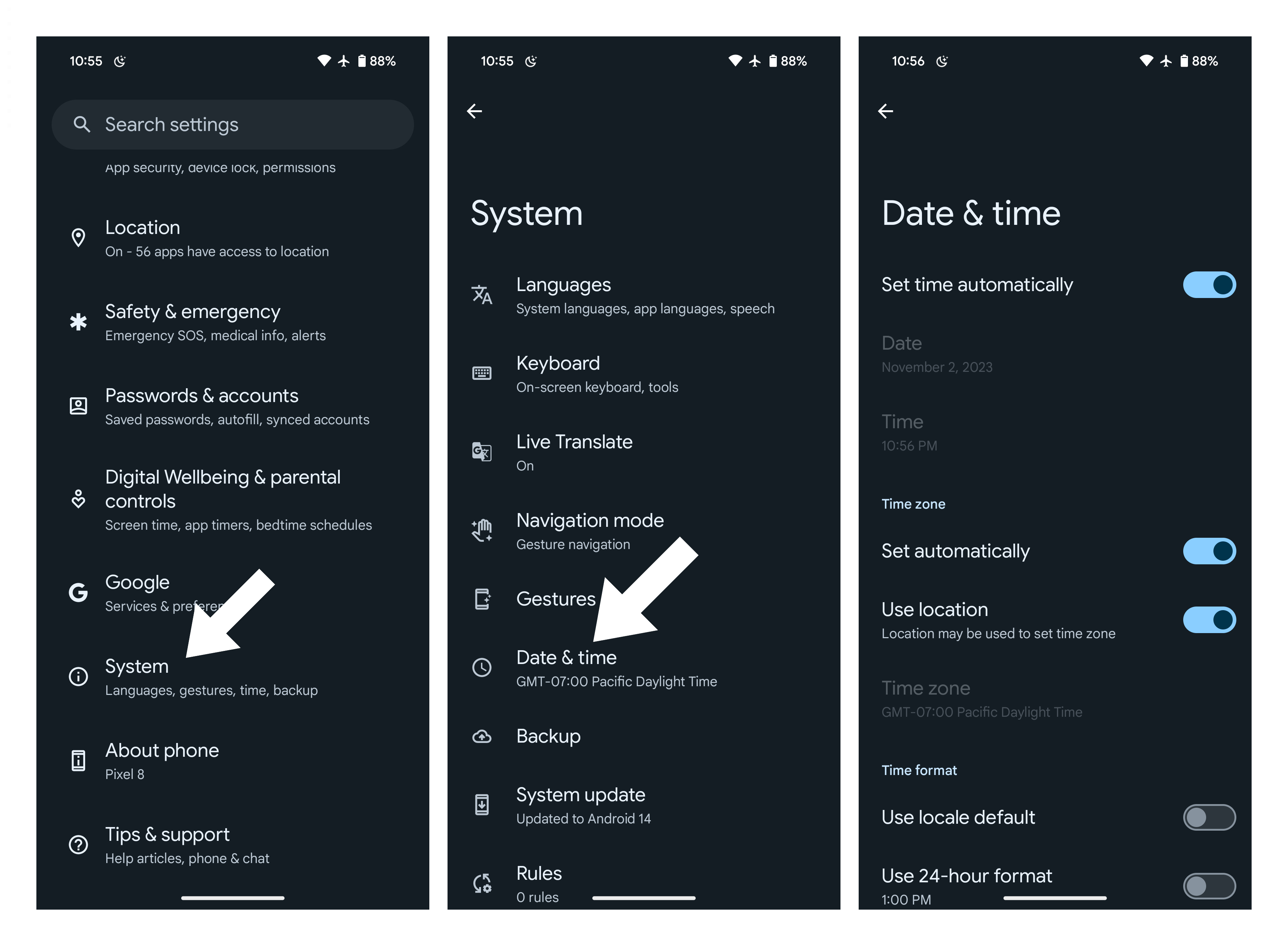
On a Pixel or Stock Android Phone
- Open the Settings app.
- Scroll down and tap on System.
- Tap on Date & time.
- Toggle on Set time automatically. You can also toggle on Use location to improve accuracy.
On a Galaxy Phone
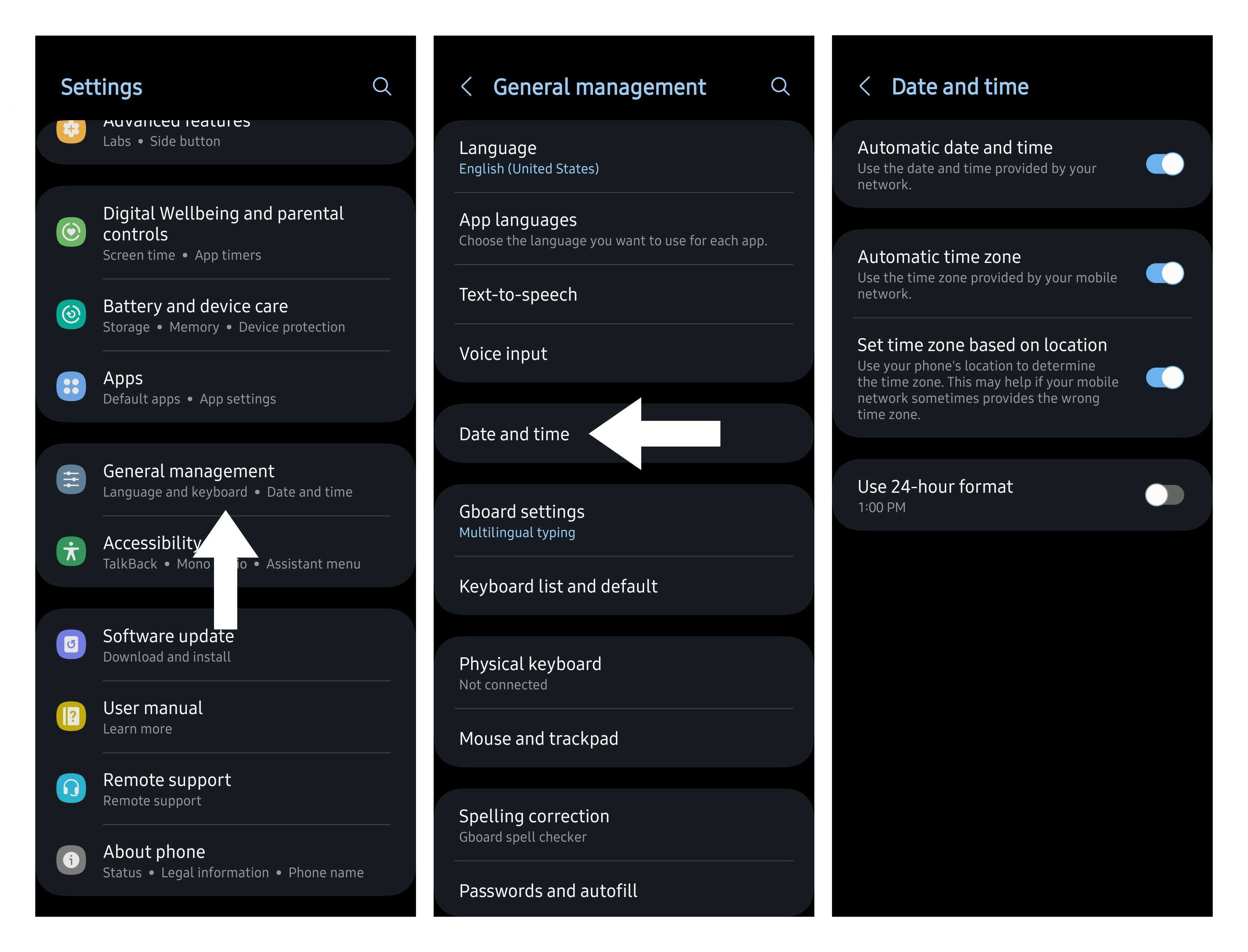
For Samsung Galaxy phones, the process may differ slightly:
- Open the Settings app.
- Scroll down and tap on General management.
- Tap on Date and time.
- Toggle on Automatic date and time.
- Toggle on Automatic time zone. You can also enable Set time zone based on location for better accuracy.
Sweet Dreams!
With your Android phone set to automatically update for daylight saving time, you can rest easy knowing that your alarms and schedules will remain accurate. No more worrying about missing important events or waking up late due to a time change.
Phone Deals
Looking for a new phone? Consider checking out deals from major retailers such as:
- Best Buy
- Walmart
- Samsung
- Amazon
- Verizon
- AT&T
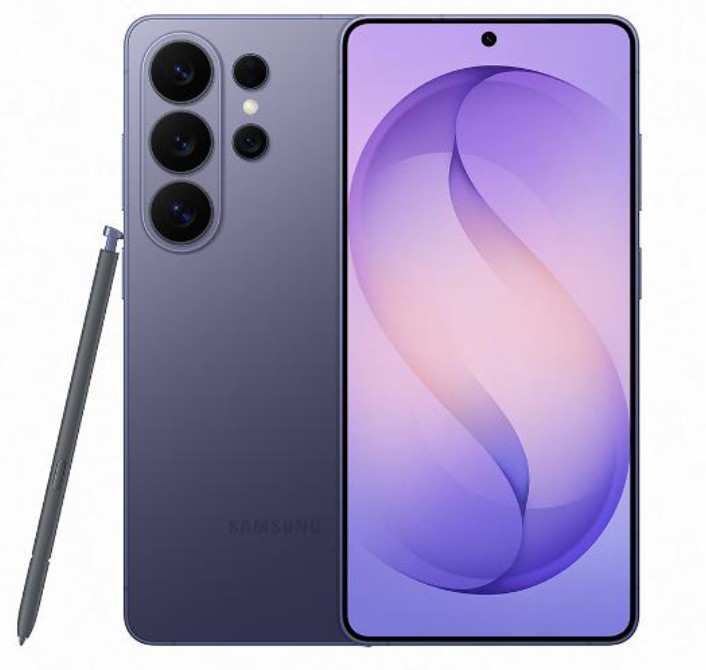
Samsung Galaxy S26 Ultra
The Galaxy S26 Ultra is Samsung's latest flagship smartphone, featuring the latest Snapdragon processor, advanced AI capabilities, and a new Privacy Display that protects your screen from prying eyes. It's the perfect choice for those who value both performance and privacy.
Like this article? For more stories like this, follow us on MSN by clicking the +Follow button at the top of this page.
Post a Comment for "Daylight Saving Time: Will Your Phone Update Automatically?"
Please Leave a wise comment, Thank you